How to Make Resume for Job: Steps, Sample & Tips for AI Screening (2026)

Quick answer: How to make resume for job means writing a one-page document that shows a company what you can do for them. Use a clean reverse-chronological format, tailor it to each job posting, and save it as a PDF. For freshers, add projects and internships. You can do it on your phone with free tools.
What Does a Resume for a Job Need to Do?
A resume is not a biography. It is a marketing document that gets you an interview. The company wants to know one thing: can you solve their problem? So every line should show a skill or result that matches the job posting.
Keep it to one page if you have less than 10 years of experience. Two pages is fine for senior roles. Use a standard font like Arial or Calibri at 10 to 12 points, and save as a PDF unless the posting asks for Word.
If you are a fresher, you still have proof of your skills. Use internships, college projects, volunteer work, and even freelance gigs. Show what you did and what happened because of it. Learn how to prove skills on a resume with no experience.
Want help with yours? Destava writes your resume with you, from your own work history. Build your resume with Destava
How to Make Resume for Job: Step by Step
Follow these steps to build a resume that gets read. Each step builds on the last, so do them in order. For a detailed walkthrough, see how to create a resume step by step.
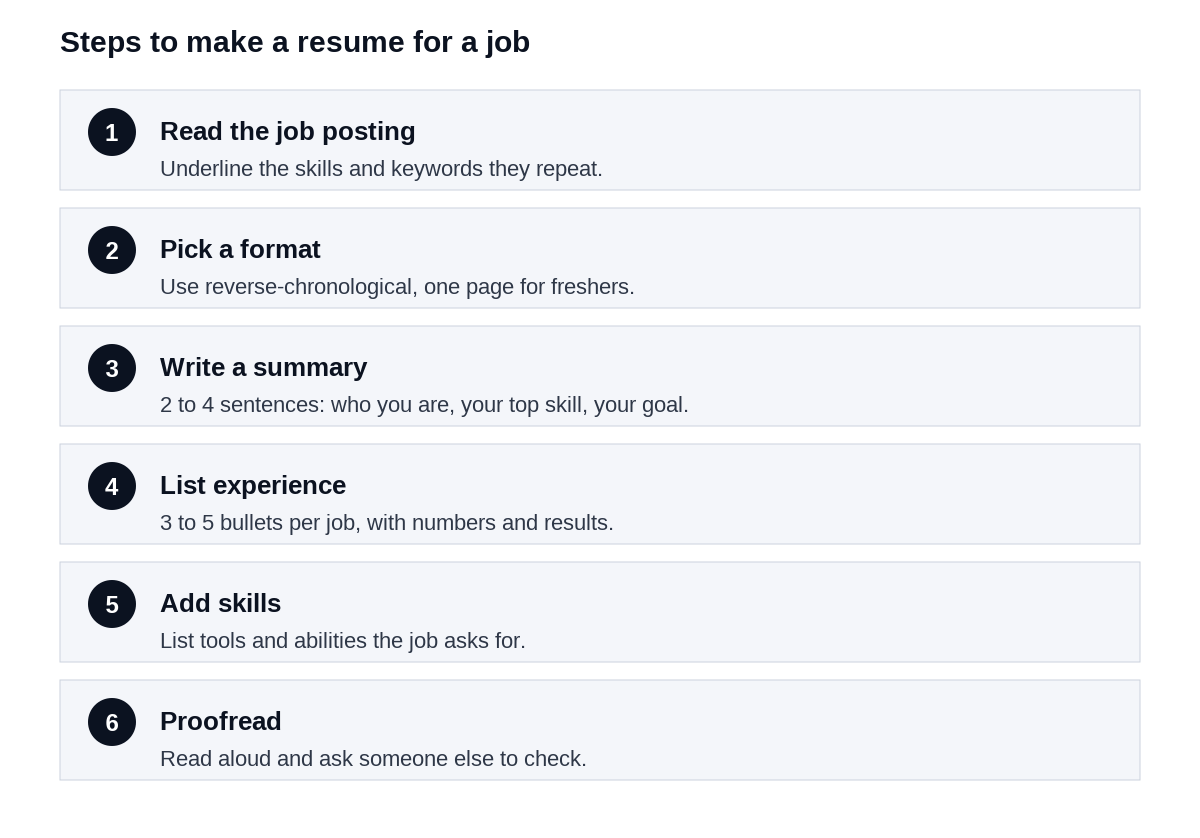
- Read the job posting twice. Underline the skills and words they repeat. Those are the keywords your resume must use.
- Choose a reverse-chronological format. List your most recent job or education first. This is what companies expect and what software can read. Learn how your resume should be structured for a job.
- Write a 2 to 4 sentence summary. Say who you are, your top skill, and what you want to do. For example: "Customer support associate with 3 years of experience, looking to bring my problem-solving skills to a growing team."
- List your experience with bullet points. For each job, write 3 to 5 bullets that show results, not duties. Use numbers: "Resolved 30+ tickets a day" beats "Handled customer queries."
- Add a skills section. List the tools and abilities the job asks for, like "Excel," "Python," or "Hindi and English." Keep it to a simple list.
- Proofread twice. Read it aloud, then ask someone else to check. One typo can cost you the interview.
Resume for Job Fresher: What to Write When You Have No Experience
If you are a fresher, you do not need to apologize for missing experience. Instead, show what you have done in college, internships, or projects. Companies hire freshers for potential, so prove you can learn and deliver.
- Put education first, then projects, then skills.
- Use college projects like a final-year app or a marketing campaign as your "experience."
- Add any certification, workshop, or online course that is relevant.
- Include volunteer work if it shows leadership or teamwork.
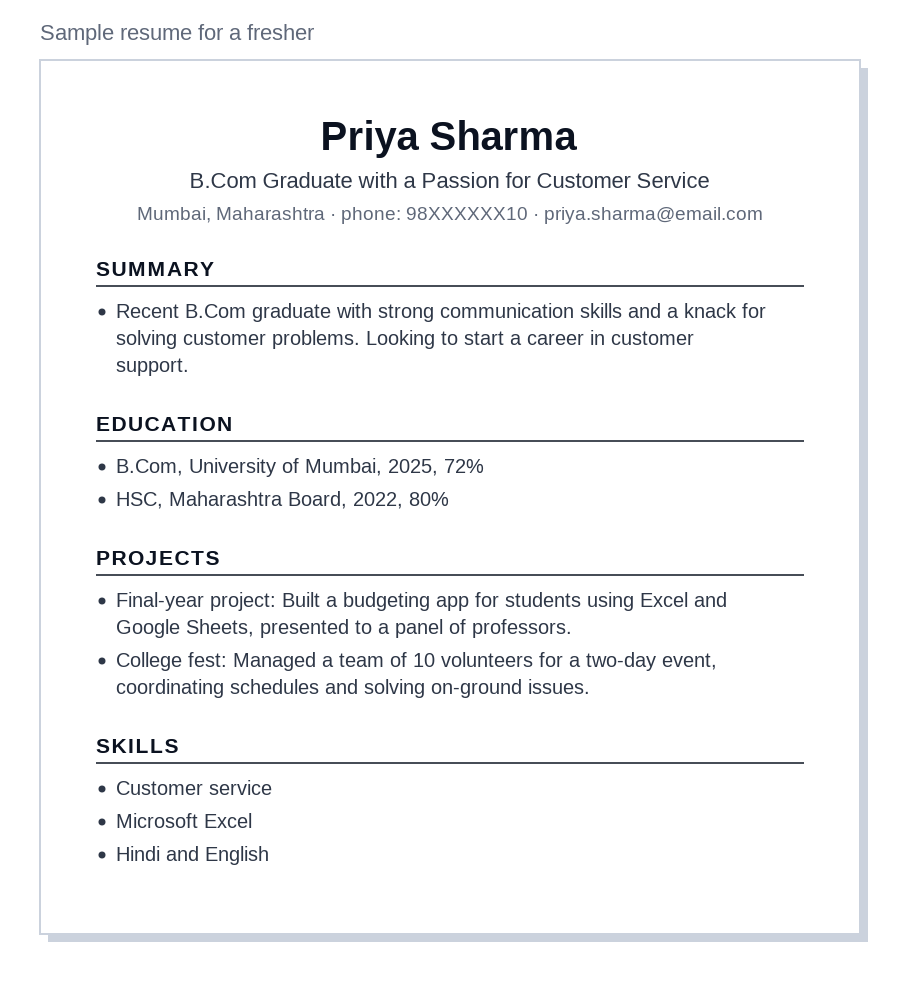
Here is a sample resume for a fresher. Copy the structure and replace the details with your own.
How to Make Resume for Job in Mobile: Yes, You Can
You do not need a computer to make a good resume. You can do it entirely on your phone. Use Google Docs or any free word processor app. Pick a simple template, fill it in, and export as PDF.
Some job portals have a built-in resume builder you can use. But a clean PDF you made yourself works just as well. Do not pay for a resume maker unless you really want to. A simple, well-written resume made on your phone is enough.
How to Make Resume for Job Application: Tailor It Every Time
Never send the same resume to every company. The job posting tells you exactly what they want. Use their words in your resume. If they say "project management," write "project management," not "handled projects." This helps you pass automated filters and shows you actually read the posting. Learn how to create a resume for a job that matches the posting.
LinkedIn has a feature called Resume Tips that helps you tailor your resume for a job. You upload a resume you want to improve, and it gives you insights and advice on how to make it more effective. Use it when you are applying to a job you really want.
For sarkari jobs or government positions, follow the official notification exactly. Those applications often have their own format, and your regular resume may not be what they want.
How AI Screening Changes Your Resume in 2026
Many companies now use software to read resumes before a human does. This software, called an applicant tracking system (ATS), scans for keywords and a clean layout. If your resume has tables, images, or fancy fonts, the software may not read it correctly.
To pass AI screening, use a standard format, save as PDF, and repeat the exact keywords from the job posting. Do not stuff keywords unnaturally. Write normally, but make sure the important terms appear in your summary, skills, and experience. See how to format an ATS-ready resume that gets read.
AI tools can also help you write your resume. You can use a chatbot to draft bullet points or a summary, then edit it to sound like you. That is fine, as long as you check every fact and do not invent experience.
Common Mistakes That Ruin a Resume
Avoid these mistakes, and your resume will already be better than most. Try resume edits that get more interviews.
- Including personal details like age, photo, or marital status. Not needed and can work against you.
- Using a generic summary that could apply to anyone. Make it specific to you and the role.
- Writing long paragraphs. Bullet points are easier to scan.
- Listing too many old jobs. Focus on the last 10 years or the most relevant work.
- Forgetting to tailor for each job. One resume for all jobs is the fastest way to get rejected.
Your Next Step: Build One Resume Today
Open Google Docs on your phone or computer, pick a simple template, and write your summary and skills first. Then add your experience or projects. Finish it today, even if it is not perfect. You can always edit it later.
If you want help building or fixing your resume, improving your LinkedIn profile, or preparing for interviews, Destava can guide you through the whole process.
Frequently asked questions
How to make the best resume for a job?
The best resume is tailored to the job posting. Use the exact keywords from the posting, show results with numbers, and keep it to one page. A clean format with bullet points beats a fancy design. Proofread twice, and save as PDF.
How to make a resume for a job interview?
A resume for an interview is the same as one for an application, but bring a printed copy. Make sure it matches your application exactly. Review it before the interview so you can talk about every point. Add a short summary at the top to guide the conversation.
How to make a resume for a job in mobile?
Use Google Docs or any free word processor app on your phone. Pick a simple template, fill in your details, and export as PDF. You can also use job portal resume builders. A clean PDF made on your phone works just as well as one made on a computer.
How to make a resume for a job with no experience?
Focus on your education, projects, internships, and volunteer work. Show what you did and what you learned. Use numbers where possible, like "managed a team of 10" or "increased attendance by 20%." Companies hire freshers for potential, so prove you can learn.
What is the best format for a resume?
The reverse-chronological format is the best for most jobs. List your most recent experience first, then older roles. It is easy for both humans and software to read. Avoid tables, images, and fancy fonts. Keep it to one page for freshers, two for senior roles.
How long should a resume be?
One page is best for freshers and professionals with less than 10 years of experience. Two pages is fine for senior roles with more relevant experience. Never go beyond two pages. Recruiters often spend very little time on a resume, so keep it short and scannable.
Should I include a photo on my resume?
In most cases, no. In India, photos are not needed for private sector jobs and can lead to bias. For sarkari jobs, follow the official notification. If a photo is required, use a professional headshot. Otherwise, leave it out and use the space for skills.